
Uncovering StreamRat: From Meta Ads to Full Device Takeover
02 September 2026

ThreatFabric researchers have uncovered StreamRat, a new Android banking trojan promoted to Spanish-speaking users through Meta and TikTok advertisements impersonating a free TV-streaming service, with the campaign reaching approximately 570,000 potential victims. Following a two-stage installation, StreamRat abuses Accessibility Services and MediaProjection to provide operators with near-complete control over infected devices, combining VNC and hidden-screen control, UI-tree collection, keylogging, credential-stealing overlays, internet and screen-blocking capabilities.
In late July 2026, while monitoring advertisers within the Meta ecosystem that were using TV streaming-themed lures already familiar to us, we identified a campaign named “Steamtv Esp.” The threat actor had deployed a phishing website targeting Spanish-speaking users.
If a victim proceeded with the file download, the payload was retrieved from a GitHub repository belonging to the same user who had previously distributed the Mirax trojan. The downloaded file was a dropper closely resembling the one previously used to deploy the Mirax payload. In this case, however, the final payload was a previously unseen trojan, which we named StreamRat.
In this report, we provide details on StreamRat’s distribution mechanisms and technical capabilities.
Key takeaways from this report:
- The vast majority of observed victims were located in Spain.
- The threat actor has used at least three different financial malware families, including GodFather, Mirax, and StreamRat.
- Based on the code of the trojan’s control panel, StreamRat appears to have been developed as a Malware-as-a-Service (MaaS) offering.
- The StreamRat dropper implements an Internet-blocking mechanism - a relatively new TTP that has already been observed across multiple droppers and appears to be gaining popularity.
Modus Operandi
The infection process consists of several stages.
Stage 1: Preparing the advertising campaign in the Meta ecosystem as well as in TikTok.
At this stage, the cybercriminals deploy a website that will later be promoted through their advertising campaigns. They also purchase Meta ads themed around streaming services. One such campaign reached approximately 570,000 Meta users between 11 June 2026 and 3 July 2026.
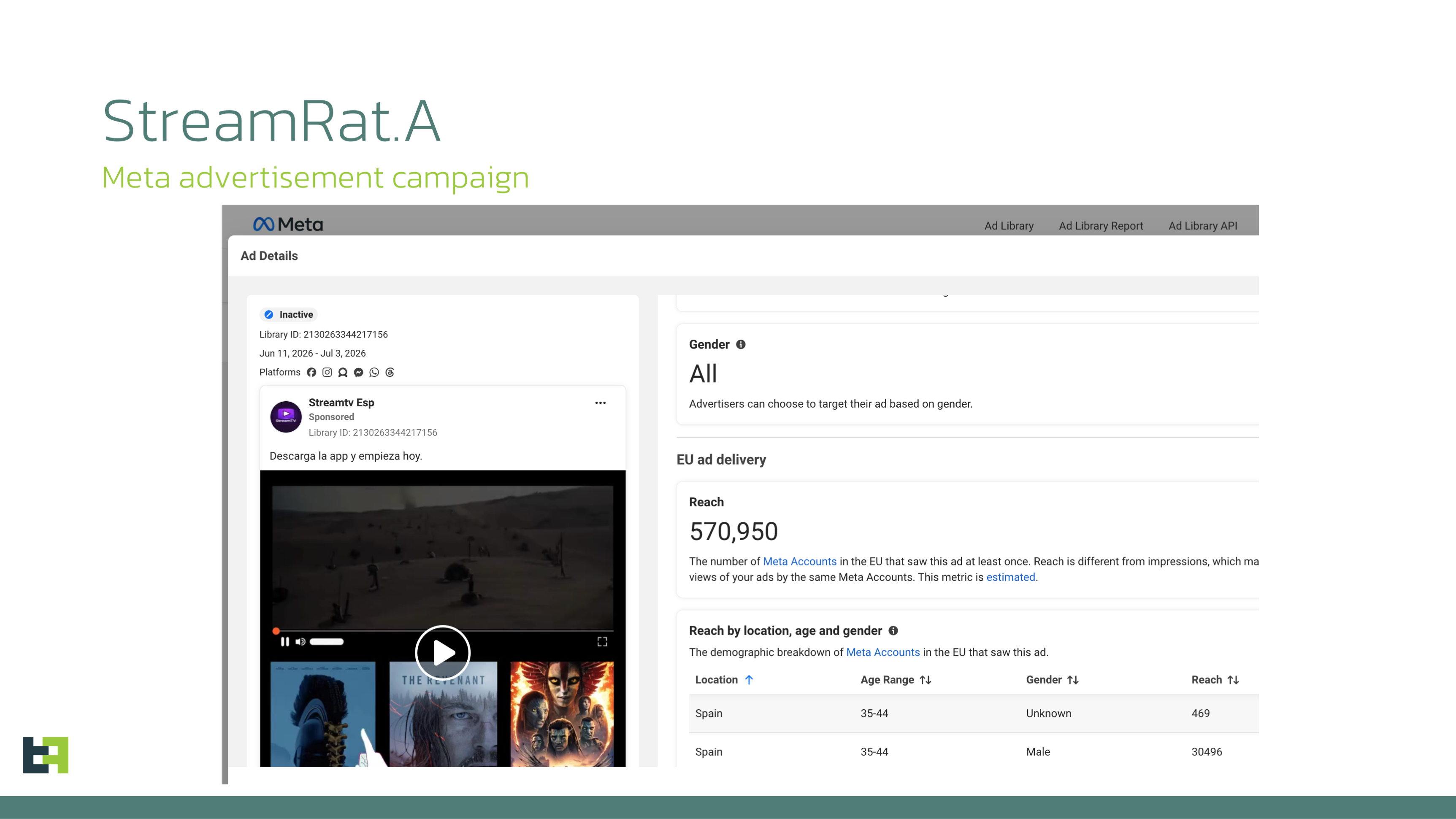
Based on the advertising campaign data, the primary targets were Meta users in Spain. We cannot determine which specific Meta platform was the main focus of the campaign; however, the same advertising banners were likely displayed on both Facebook and Instagram.
Stage 2: Redirecting the victim to the malicious website
If a victim interacts with the social media lure and visits the specially crafted website, they are required to complete several additional steps before downloading StreamRat.
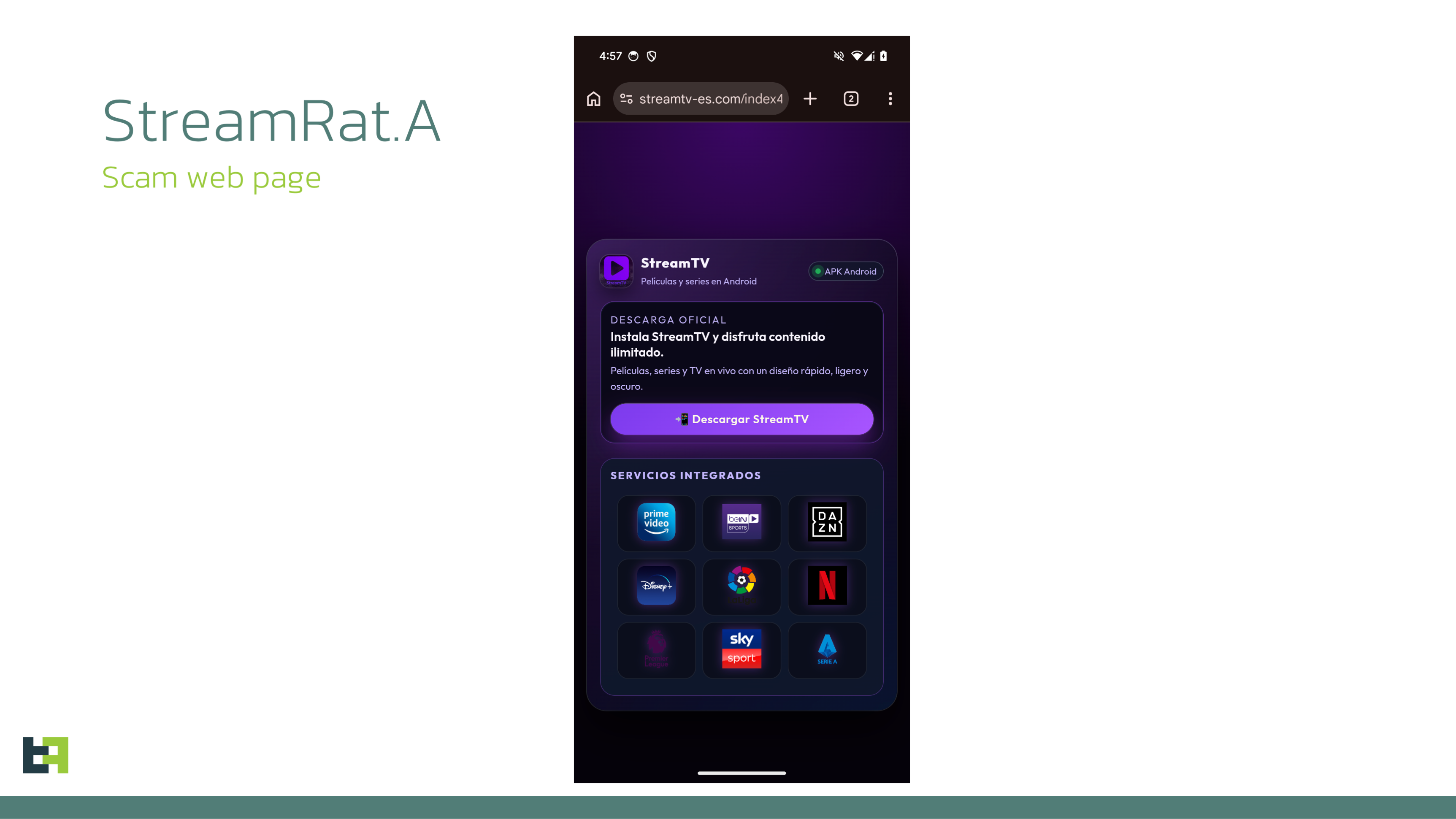
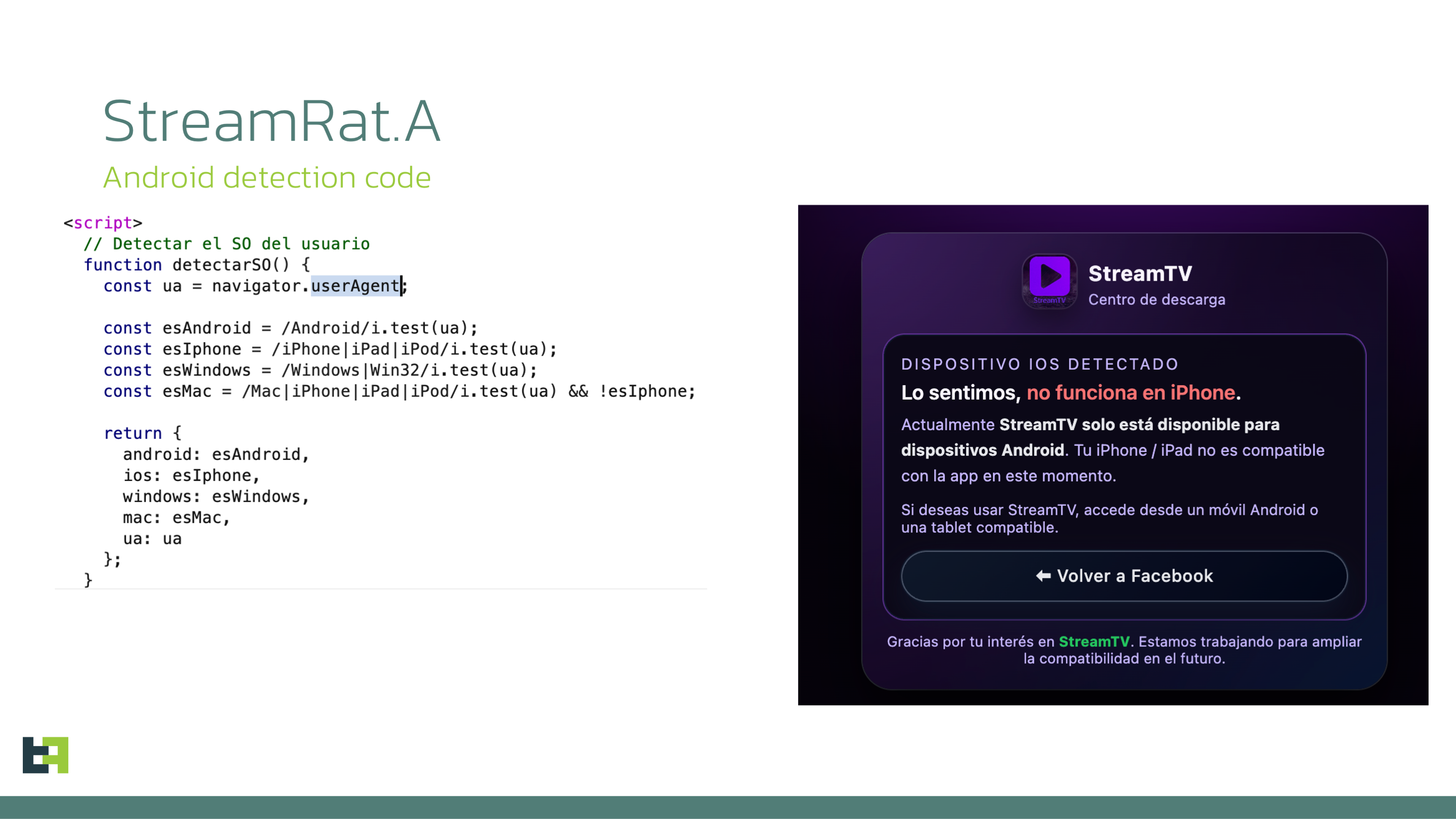
First, the website uses JavaScript to determine whether the victim is using an Android device.
If another operating system is detected, the website displays an error and prevents the download by simply hiding the download button.
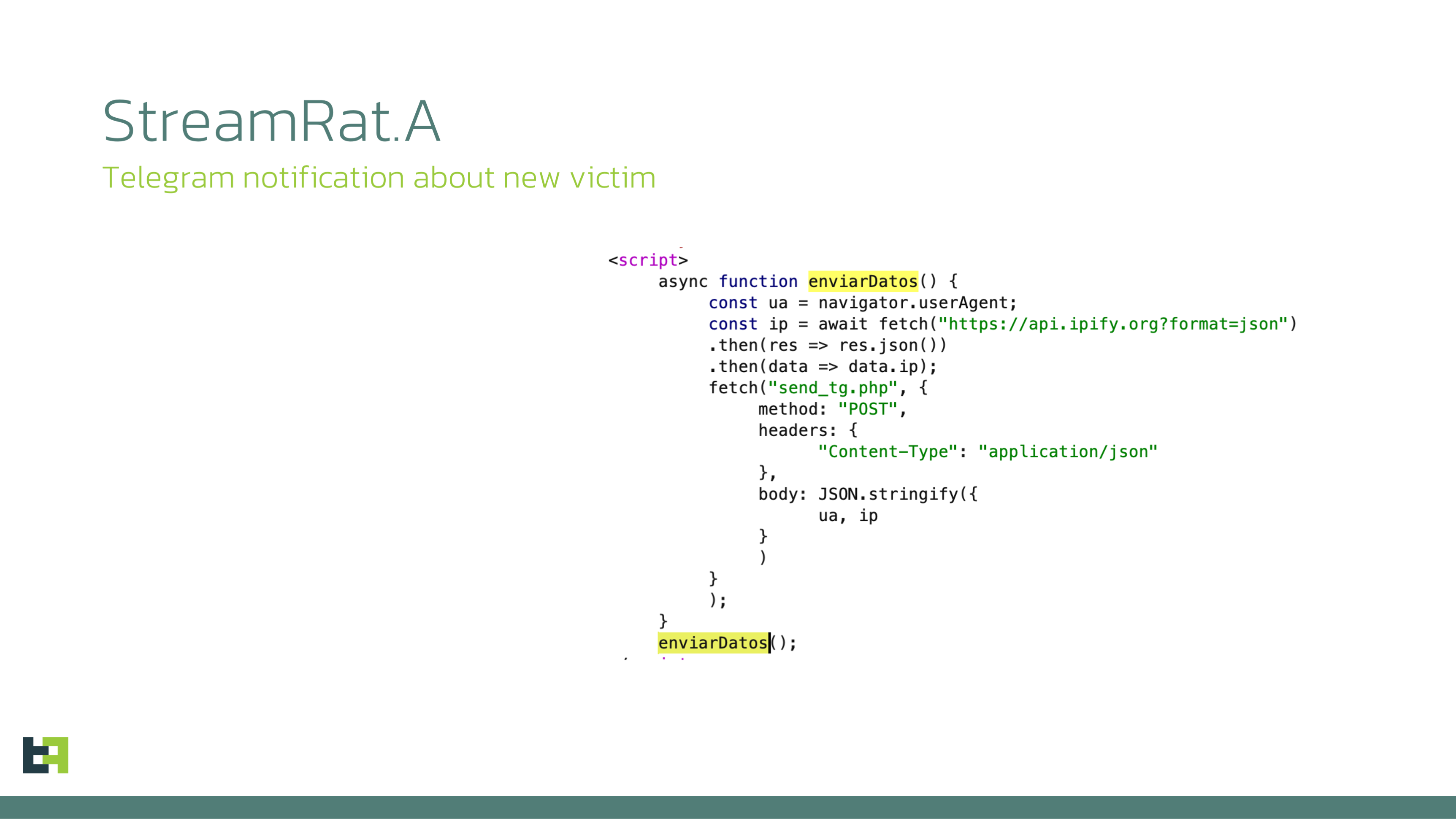
If the device is identified as Android, however, an application download button becomes available. When the victim clicks it, they are redirected to another page named "r1edmi.html". At the same time, the page script calls a backend API that sends a notification via a Telegram.
The purpose of r1edmi.html is to determine which application the victim used to open the lure website: Instagram, TikTok, Facebook, or a standalone browser. The instructions shown to the victim depend on this result. By default, the page displays a six-step instruction for Chrome.
Unsurprisingly, the instructions guide the victim through enabling the installation of applications from unknown sources in Chrome and granting access to Accessibility Services.
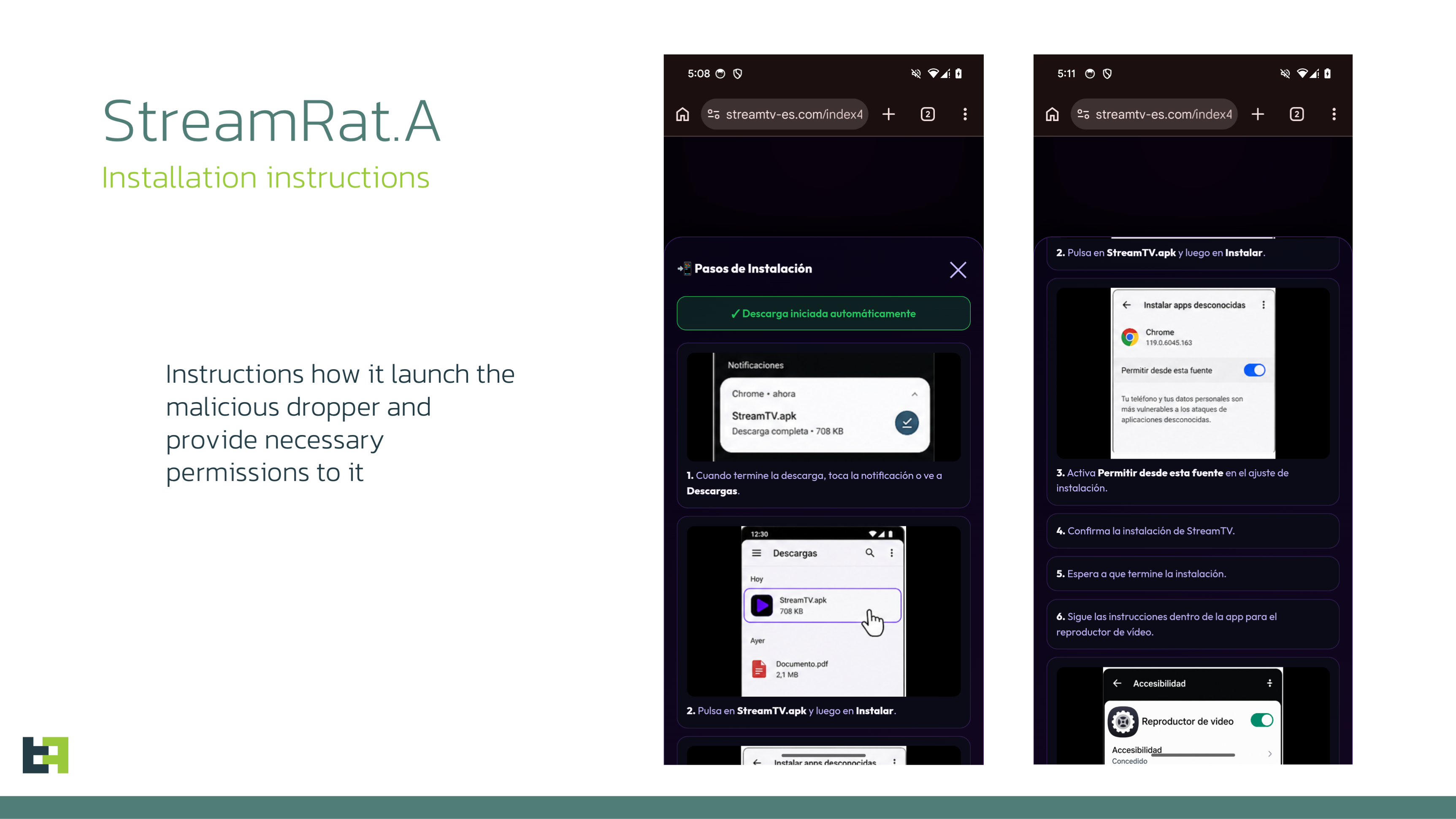
While displaying these instructions, the webpage also queries the backend API for the currently active malware download URL.
An interesting detail is that the distribution website has its own dedicated control panel.
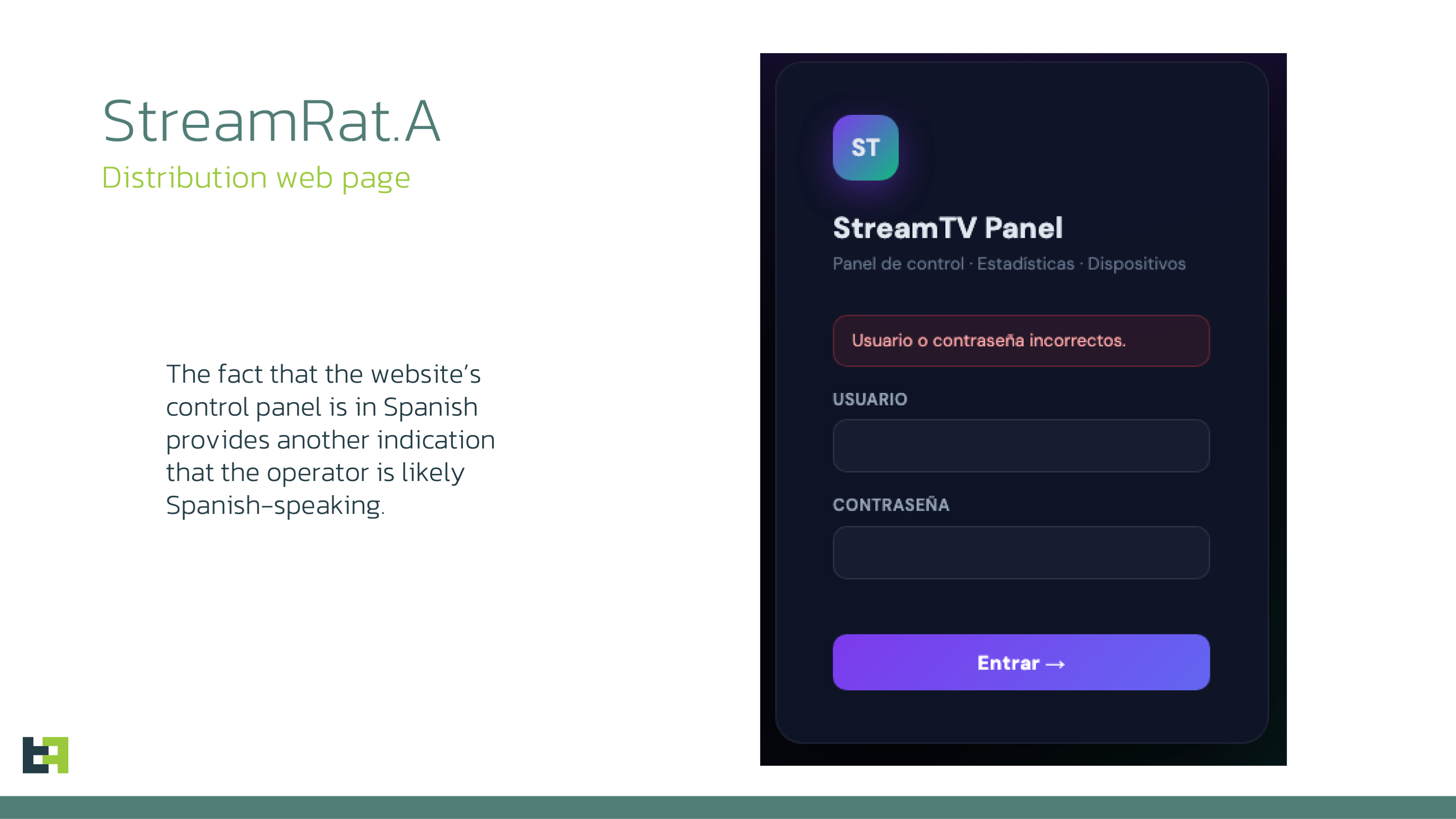
Once the URL is received, the script instructs the victim’s browser to download a file named app.apk.
Stage 3: Dropper execution
Once the victim downloads and launches the APK, the dropper interface is displayed.
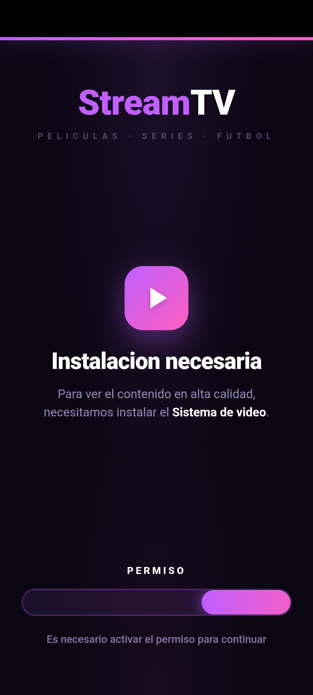 One notable aspect of the dropper is that its interface consists of several interconnected HTML pages containing embedded JavaScript:
- Index.html
- Set_launcher.html
- Vpn_required.html
Each page is loaded at a specific stage of the infection process.
The first page, set_launcher.html, checks whether the dropper is configured as the device’s default Home application. If it is not, the victim is prompted to set the dropper as the default launcher. From that point onward, whenever the victim presses the HOME button, they are redirected back to the dropper interface.
The dropper then loads its main page, index.html, which automatically triggers the download process in the Android component using a URL embedded in the page.

The payload is then downloaded and saved to SD card into Downloads folder by the name update_{timestamp}.apk.
Interestingly, the dropper stores the payload in the public Downloads directory rather than in its private application storage.
Next, the dropper requests permission to install applications from unknown sources and installs the payload using Android’s session-based package installation mechanism.
Once installation is complete, the payload is launched.
After the payload starts, the dropper disables the blocking VPN connection and waits until the payload obtains access to Accessibility Services. Once this occurs, the dropper removes itself as the default Home application.
This completes Stage 3.
Stage 4: StreamRat payload execution
Immediately after launch, StreamRat requests access to Accessibility Services. Once the permission is granted, the trojan connects to its C2 server.
After a short exchange with the server, the bot receives a command with id 35, instructing it to send a list of all applications installed on the device.
StreamRat collects the application list, splits it into chunks, and sends each chunk to the server. Installed applications are split into chunks of up to 50 entries. The final chunk is marked with isLast=true. The delay between each chunk is 10 milli seconds.
In parallel, the trojan captures data entered by the victim and continuously monitors which application is currently displayed on the device screen.
Whenever the foreground application changes, StreamRat sends two requests to the server, maintenance_check and injection_check, both containing the package name of the application currently visible on the victim’s device.
From this point onward, the subsequent stages of the attack depend on the actions taken by the bot operator.
Technical details
Internet blocking
This is not the first time we have observed droppers implementing a new anti-detection technique based on blocking Internet access by establishing a deliberately non-functional VPN connection.
At a certain stage before downloading the final payload, the dropper requests permission to create a VPN connection. If permission was provided the dropper establishes a VPN connection and routes all device traffic through it, while explicitly excluding the dropper itself from the VPN. At the same time, no traffic processing takes place, and the traffic is not forwarded anywhere. After the payload was successfully installed and executed dropper turned off the VPN connection, so the payload could communicate with control server normally.
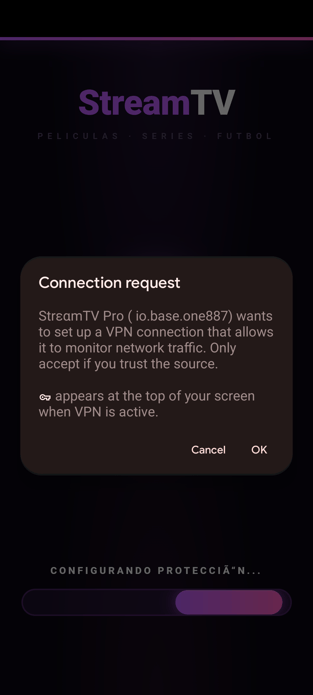

We believe this is intended to temporarily deprive other applications of Internet connectivity, potentially preventing security products from performing cloud-based checks of the payload. Google Play Protect is a particularly plausible target, as it is enabled by default on Play Protect-certified Android devices and performs additional analysis of applications installed from unknown sources. However, Play Protect also provides offline detection for known potentially harmful applications, meaning that the mechanism does not completely disable its protection. We therefore assess that the technique is more likely intended to reduce the effectiveness of online reputation and code-analysis mechanisms rather than bypass Play Protect entirely.
C2 Communications
Communication with the C2 server is implemented in a distinctive way and represents one of StreamRat’s characteristic features.
At the beginning of the communication flow, the bot sends a GET request to the C2 server in order to upgrade the connection to WebSocket. In addition to the Upgrade: websocket header, the request contains three custom headers:
- X-Device-Id - contains the unique device identifier.
- X-Device-Model - contains the device manufacturer and model.
- X-Api-Level - contains the Android SDK/API level.
The RPC-like protocol is built on top of a WebSocket connection, with both outbound and inbound messages supporting either plain-text or binary-text formats. For example, the bot sends the device fingerprint as a regular JSON string, while the list of installed applications and screencast frames are transmitted in binary-text form.
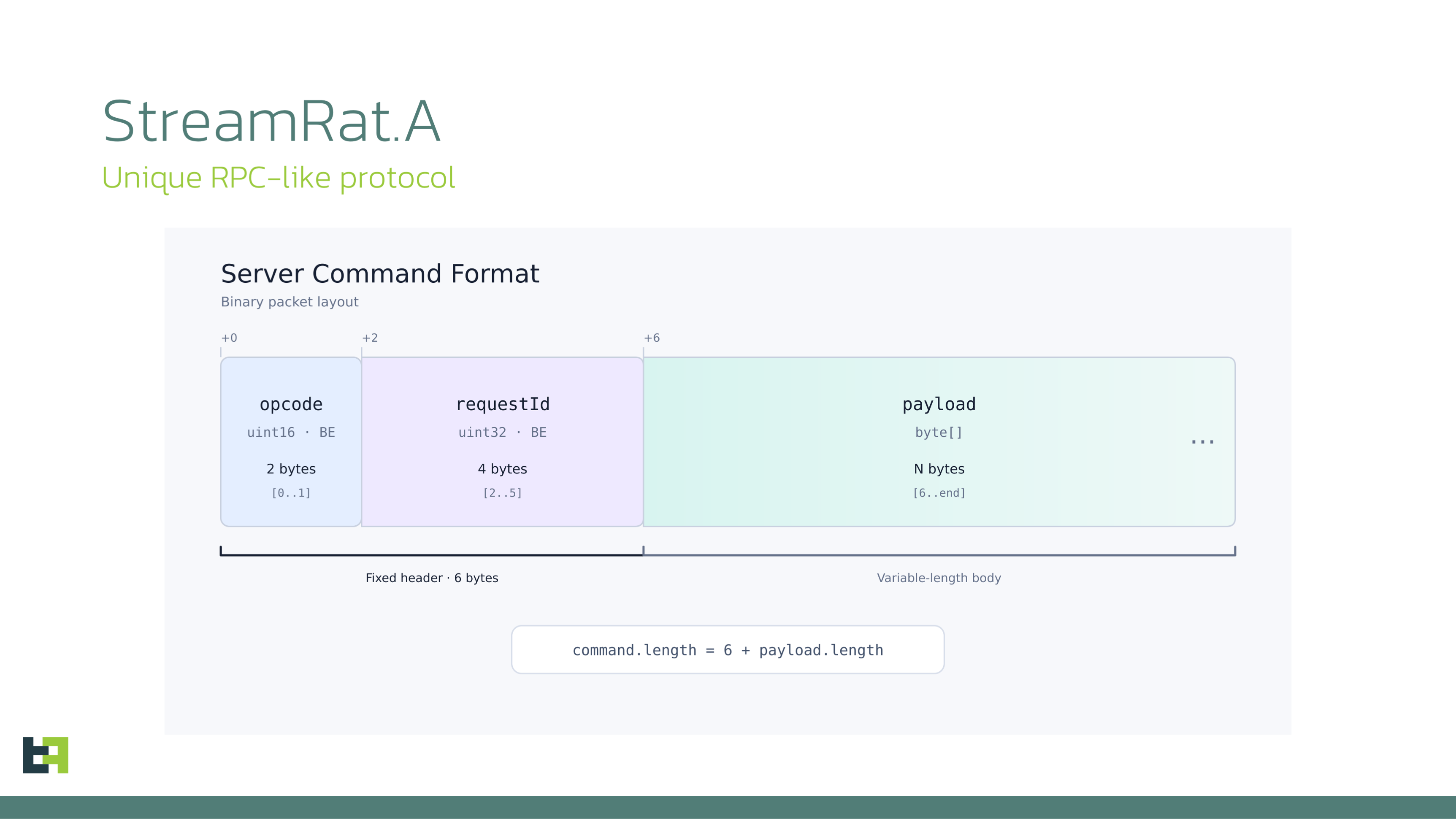
The binary command format used by the server is as follows:
- First 2 bytes: command opcode
- Next 4 bytes: command identifier, which is later used in the response
- Starting at byte 6: command payload
Text-based commands from the server are transmitted as JSON strings.
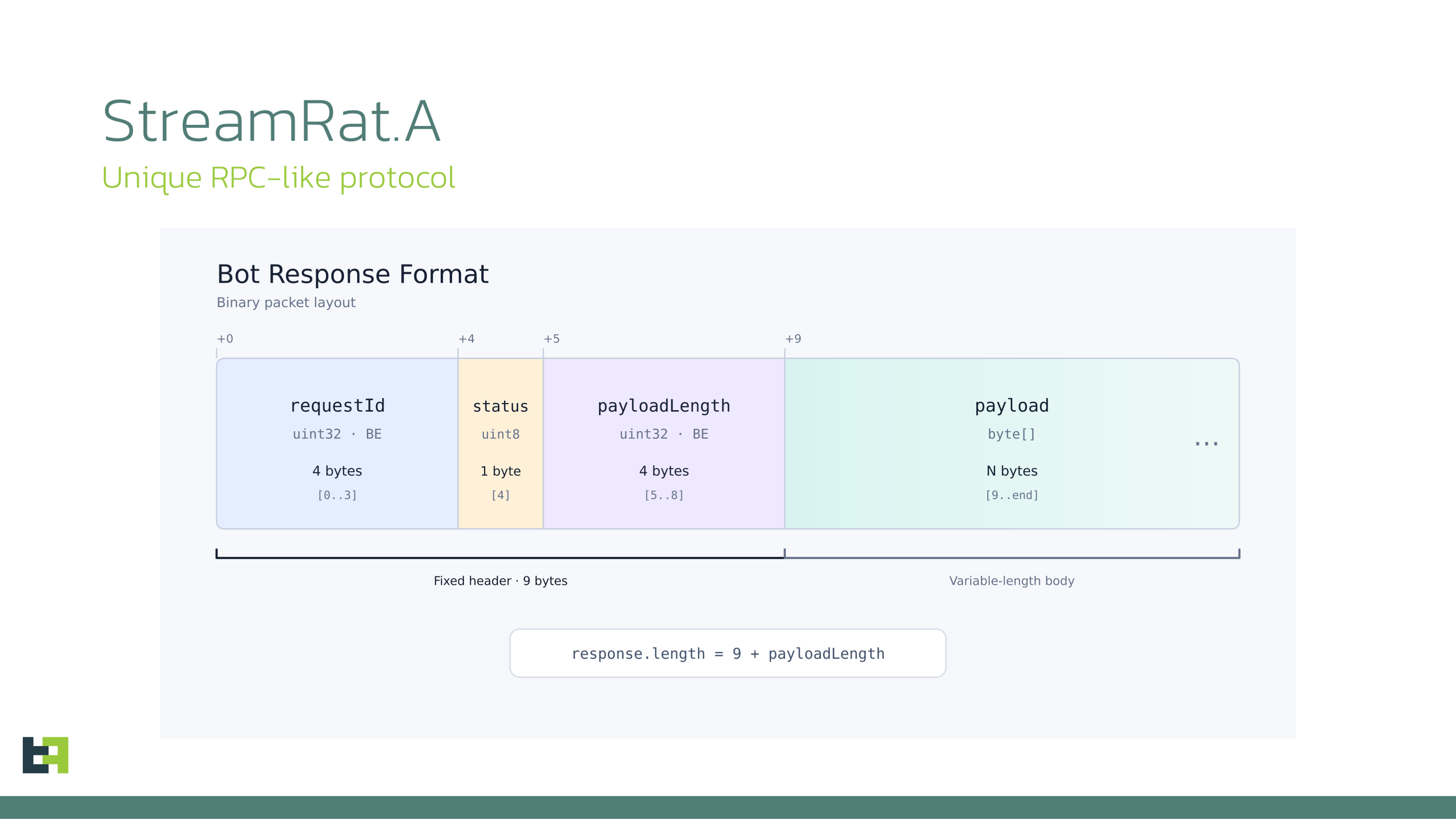
The bot’s binary response format is structured as follows:
- First 4 bytes: command identifier
- Next 1 byte: command execution status, where 0 indicates success and 1 indicates an error
- Next 4 bytes: payload length
- Starting at byte 9: payload data
The C2 server address is hardcoded in the trojan and is not designed to be changed dynamically. The same applies to the bot tag.
Media streaming
StreamRat also supports screen streaming in two modes:
VNC
In this mode, the bot relies on the MediaProjection API. Upon receiving a command from the C2 server, it launches the native Android screen-capture permission dialog. The bot then automatically interacts with the dialog, selecting full-screen capture and the option to share all applications rather than only the StreamRat application.
Once permission is granted, the bot uses standard Android mechanisms such as createVirtualDisplay() and ImageReader to obtain a copy of the device screen and encode captured frames as WebP images.
There are several notable implementation details:
a) Duplicate frames are not transmitted.
The bot calculates Adler32 checksum over the relevant content of each frame. If the checksum matches that of the previous frame, the new frame is discarded.
b) Aggressive image compression is used by default.
The captured screen is scaled down to 35% of its original dimensions and then encoded as WebP with a quality setting of 40%. This represents fairly aggressive compression, but is likely sufficient for effective remote interaction while significantly reducing bandwidth usage.
If one of the static overlays is active, however, the bot switches to WEBP_LOSSLESS, preserving maximum image quality. The resulting frame size is limited to 20 MB, which provides a substantial margin given the 35% scaling factor.
HVNC
In this mode, the bot captures a screenshot every 200 ms using the Accessibility API takeScreenshot() method. The resulting image is scaled down to 35% of its original size, encoded as WebP with a quality setting of 40%, and sent to the C2 server using the same frame format as in VNC mode.
The key difference between the two modes is their visibility to the victim. Screenshot capture through the Accessibility API is not directly visible to the user, while MediaProjection-based screen casting can typically be identified by the corresponding screen-sharing indicator displayed in the Android status area.
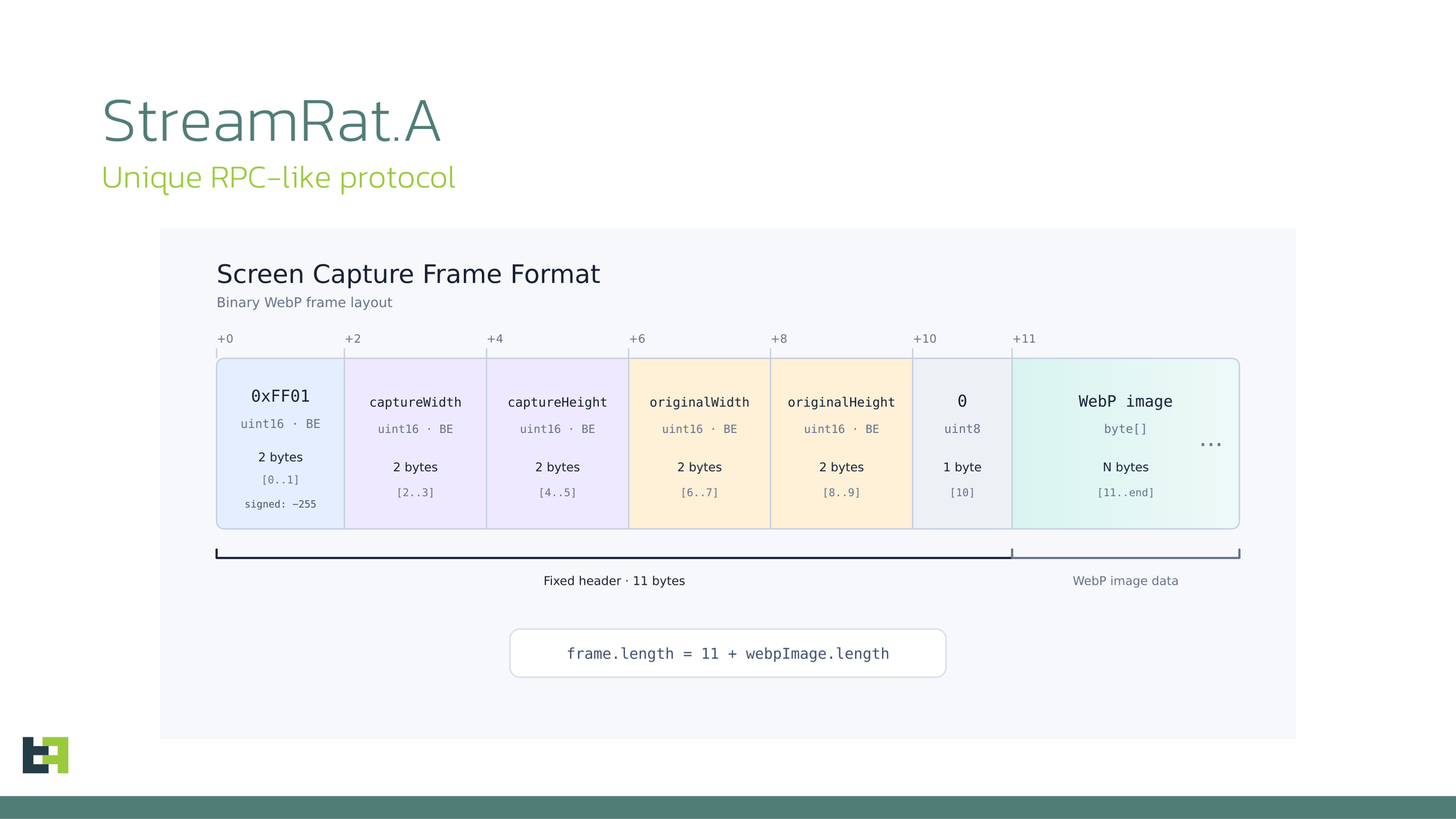
For both VNC/HVNC the resulting WebP images is embedded into an RPC frame containing:
- Width and height of the transmitted frame
- Original width and height of the captured device screen
- A one-byte error/status field
- The WebP image data
Accessibility Node Viewer
This functionality is another characteristic feature of modern banking trojans. In practice, it can be viewed as a text-based form of screen casting: instead of receiving a bitmap of the victim’s screen, the operator sees a reconstructed representation built from individual AccessibilityNodeInfo elements.
This is arguably one of the fastest ways to collect, transmit, and visualize what is currently displayed on the victim’s device. StreamRat also implements an additional optimization to reduce redundant traffic.
Whenever the bot receives an event indicating that the screen content has changed, it performs the following steps:
- Dumps the complete UI element tree using the Accessibility Service API, including element bounds and associated text.
- Serializes the resulting structure into a JSON object.
- Calculates an Adler-32 checksum over the serialized JSON data.
- Compares the checksum with the one calculated for the previous dump. If the values match, the current dump is discarded.
This mechanism prevents StreamRat from repeatedly sending identical UI-tree data to the C2 server.
Overlay attacks
StreamRat supports two main groups of overlays: automatic overlays and immediate overlays.
Automatic overlays
Whenever the screen state changes and the change is caused by a non-system application - system applications are handled separately - the bot sends two requests to the C2 server: maintenance_check and injection_check. In both cases, the request body contains the package name of the application currently displayed on the victim’s screen.
The server responds to both requests with overlay configurations. However, the bot handles maintenance_response and injection_response quite differently, even though both responses may contain action: inject and the overlay body in the html field.
In the case of injection_response, the overlay body is extracted from the html field and saved to the bot’s local storage under the injections directory as:
<package_name>.html
A dedicated Activity containing a WebView is then launched. JavaScript is enabled in this WebView, together with a JavaScript interface exposed by the Android code. The previously saved HTML file is loaded into the WebView and subsequently deleted.
The JavaScript interface exposes a single function, saveAndClose, which can be called by the overlay to pass data entered by the victim back to the Android component.
Immediate overlays
Immediate overlays are static overlays that can be activated on demand. Their primary purpose is to distract or deceive the victim while the operator remotely interacts with the device through the Accessibility Services API.
- Black overlay.
This overlay covers approximately 98% of the victim’s screen with a black layer. It is generated using native code and an Android layout. The victim’s touches are blocked, while the operator can still observe the screen and control the device remotely. - Fake update overlay.
This overlay is generated from a layout bundled with the application. Functionally, it behaves similarly to the black overlay; the main difference is its visual appearance. The victim is shown a screen resembling a legitimate system update interface.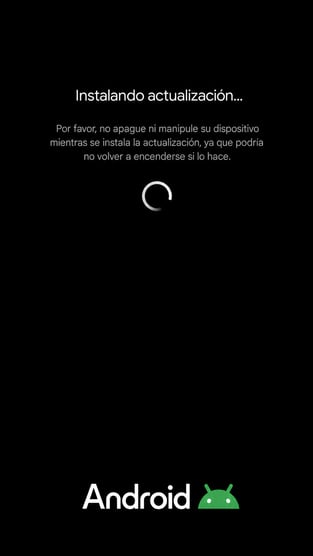
- Custom overlay.
In this case, the overlay is generated from an HTML page supplied by the operator. - Injection overlay.
This is a fully interactive overlay implemented using a WebView with a JavaScript interface. Its behaviour is similar to that of an overlay delivered through injection_response: data entered into the overlay is passed to the Android code and subsequently sent to the C2 server.
Backend analysis
As part of our investigation, we have identified several servers associated with the StreamRat infrastructure. On of the related severs hosted the StreamRat panel.
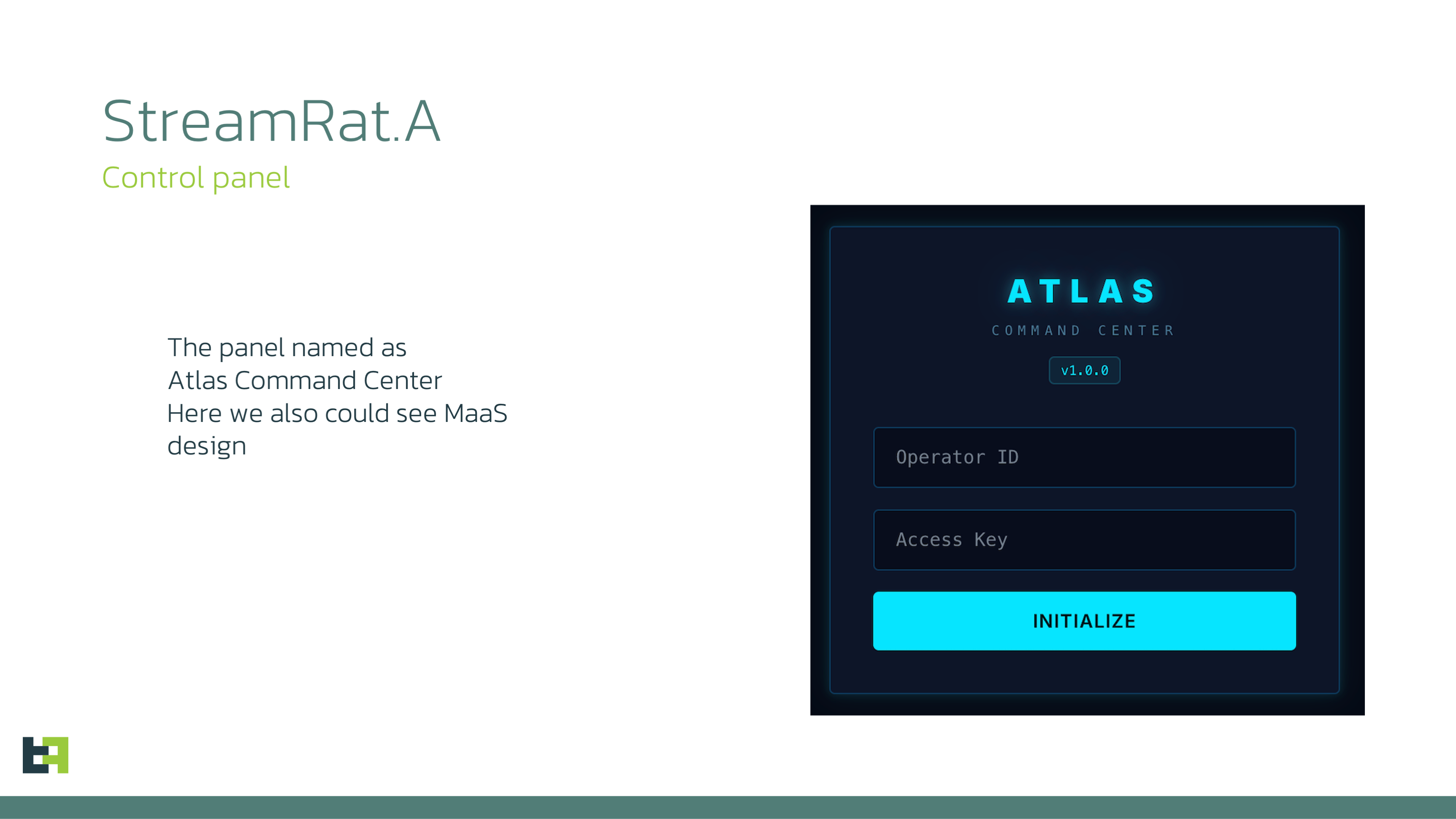
Analysing the code of the panel, we were able to reconstruct and visualize the panel as it would appear to an operator, preserving its original UI elements, styles, and navigation. However, all victim-related data shown in our reconstruction is synthetic.
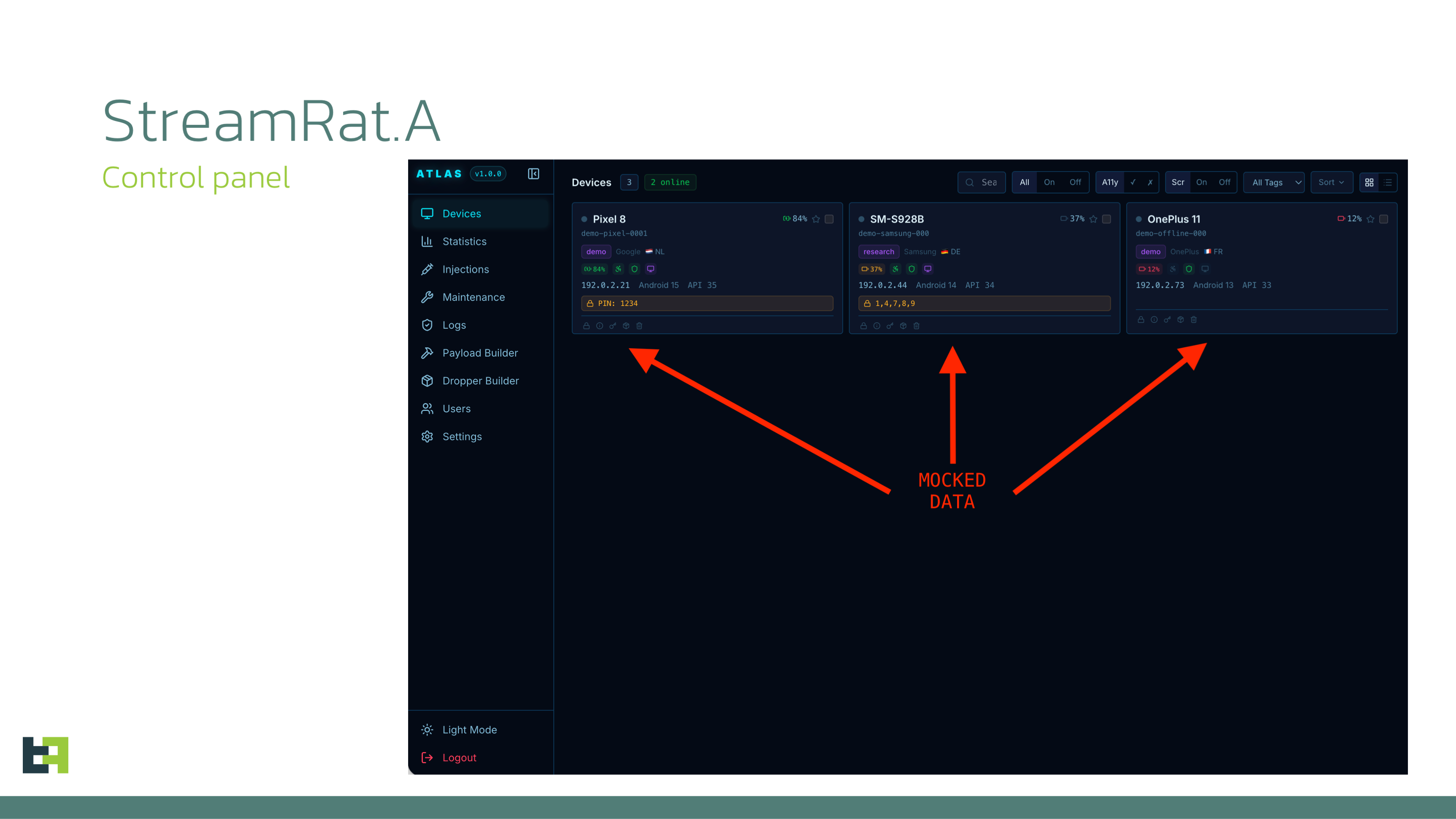
The panel contains the following pages:
-
Devices - Overview of all infected devices. The operator can see the device manufacturer and model, region, battery level, Android version/API level, intercepted PIN or pattern if available, and the current Accessibility Services status.
-
Statistics - Statistical data grouped by several parameters.
-
Injections - Management of injection overlays.
-
Maintenance - Management of static overlays.
-
Logs - History of executed commands.
-
Builder - StreamRat payload builder.
-
Dropper-builder - StreamRat dropper builder.
-
Users - Access management. Three roles are supported: user, supervisor, and admin. This role separation appears to have been designed for a MaaS model, allowing operators and higher-level administrators to have different levels of access.
-
Settings - Contains the Telegram bot and chat configuration used for notifications.
Conclusion
There is little doubt that StreamRat is a new and technically sophisticated threat, developed by individuals with prior experience in the Android malware ecosystem. Both the trojan itself and its associated control panel appear to have been designed around a Malware-as-a-Service (MaaS) model, leaving the customer primarily responsible for establishing a distribution channel.
StreamRat also uses a fairly distinctive C2 protocol, which only loosely resembles what we previously observed in Sturnus. More broadly, WebSocket-based protocols now appear to have become a common design choice for modern Android trojans.
Another interesting implementation detail is the use of Adler-32-based deduplication in several parts of the malware. This optimisation reduces unnecessary data transmission and backend load. Such engineering choices are more consistent with experienced developers building for scalability than with an inexperienced malware author.
Threat actors have started using a relatively noisy technique during the dropper stage: completely disrupting Internet connectivity by establishing a deliberately non-functional VPN connection.
This technique is very likely used to avoid cloud-based detection of unknown packages, and likely aims to avoid detection by Play Protect (while not actually fully bypassing it). The resulting loss of connectivity is also potentially visible to the victim, as applications such as messengers and other online services will temporarily stop working.
This behaviour may have an additional operational implication. If the threat actor is guiding the victim through the infection process in real time, communication would likely need to continue over a regular cellular voice call rather than through a messenger or social-media calling service affected by the network disruption.
Regardless of the exact motivation behind the technique, the combination of an application declaring both package-installation capabilities and VPN functionality should be treated as a notable risk signal and deserves closer scrutiny.
Appendix
Bot Commands
|
Commands |
Description |
|
0 |
Send pong. |
|
1 |
Execute a shell command. |
|
2 |
Retrieve device information. |
|
3 |
Display a toast notification. |
|
4 |
Paste specified text using either ClipboardManager or an Accessibility action. |
|
16 |
Perform remote-control actions through the Accessibility performGlobalAction() API. Supported actions include lock_screen, back, home, click, swipe, swipe_path, recents, and notifications. The action and its parameters are supplied as JSON. |
|
17 |
Perform a tap at specified screen coordinates. |
|
18 |
Perform a swipe between two specified screen points. |
|
19 |
Perform a custom swipe using a JSON structure containing the swipe coordinates. |
|
20 |
Simulate a Back button press. |
|
21 |
Simulate a Home button press. |
|
22 |
Simulate a Recents button press. |
|
23 |
Open the notification panel. |
|
24 |
Lock the device screen. |
|
25 |
Wake the device. |
|
32 |
Control screen capture, including start/stop operations and selection between two modes: VNC using the MediaProjection API, and HVNC using screenshots captured through the Accessibility takeScreenshot() API. |
|
33 |
Control the Accessibility Node Viewer, including start and stop operations. |
|
34 |
Control and query the status of static overlays, referred to internally as overlay. Supported modes include a black screen, an update screen, and a custom screen. The custom screen can display plain text, an HTML fragment, or a complete HTML document. This command also controls anti-uninstall protection. |
|
35 |
Control applications and notifications, referred to internally as app_list. Supported actions include launching an application by package name, extracting an icon from a specified installed package, retrieving the list of all installed applications, and creating fake notifications using a specified title, text, icon, and URL. Because the installed application list can be large, StreamRat splits it into chunks before sending it to the C2 server. |
|
36 |
Launch an HTML injection overlay. |
|
37 |
Unlock the device using a previously intercepted PIN or pattern. |
|
38 |
Enable or disable automatic acceptance of MediaProjection permission requests. |
Indicators of Compromise
|
SHA-256 |
Package name |
Application name |
C2 |